Sentence Adder Anki Addon: Add sentence in Anki editor in one click
Sentence Adder Anki Addon: Add sentence in Anki editor in one click

Add sentences to Anki editor window in one click with batch adder option
Select a word in edit field and click add button to add sentences to that fields matching the words. Also create/add sentences for any languages. The sentences database created using tatoeba language tsv files. Download language tsv file from tatoeba.
Install
Download addon from AnkiWeb
Download from GitHub release page
Features
- Create new language database
- Add random sentence in one click
- View list of all sentences matching the selected word
- Change language (Require restart of Anki to apply changes)
- Change color of sentences
- Batch sentences adder
- Sentences containing spaces
Usage
Install
1. Install Addon from AnkiWeb
Anki -> Tools -> Add-ons -> Get Add-ons...
Paste the code 1682655437 and install.
2. Restart Anki and open the Addon to add new languages.
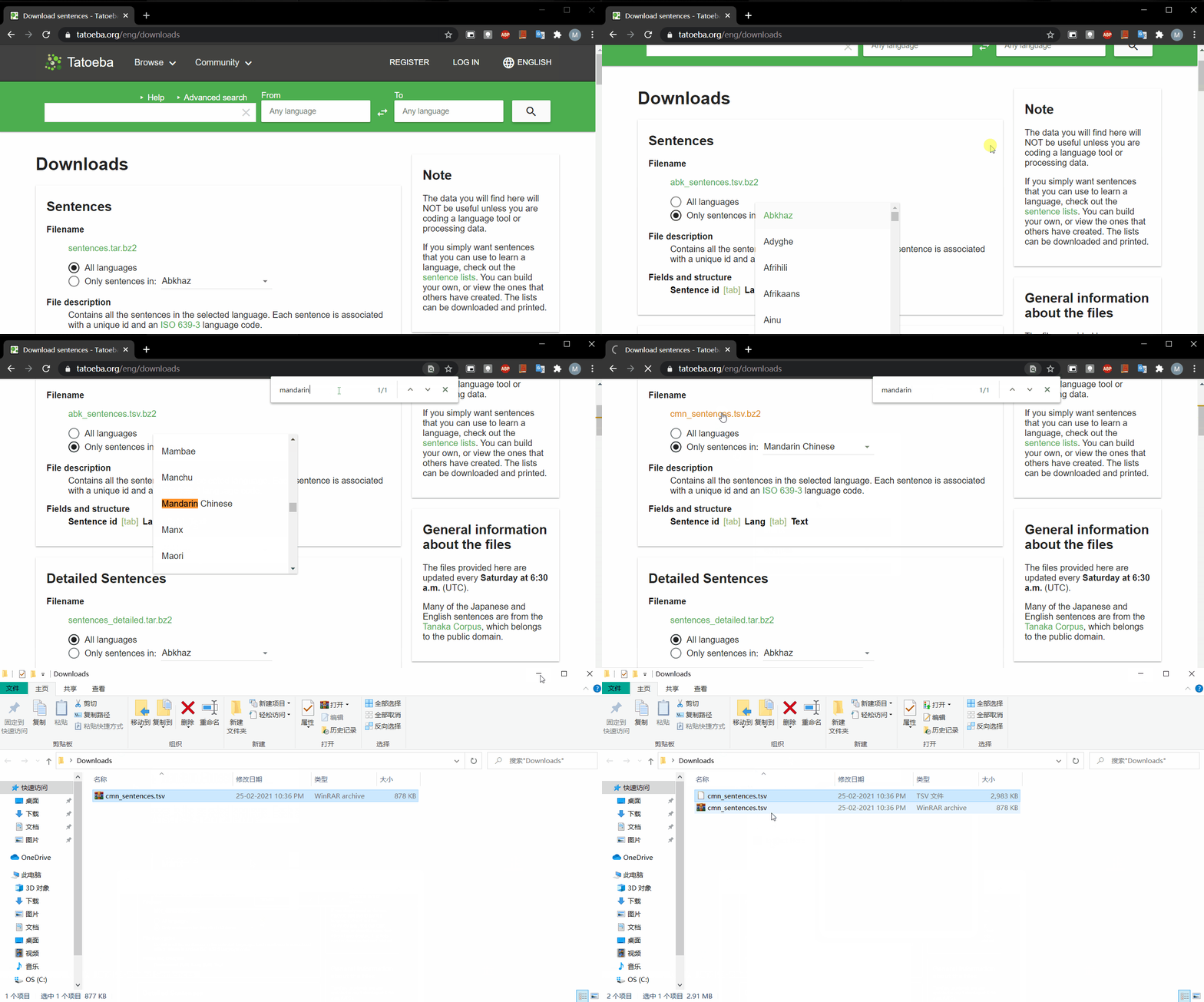
3. Download language of choice from tatoeba.org
4. Open the installed Addon in Anki
Anki -> Tools -> Sentence Adder...
5. Click Add new language
6. Enter language name
7. Select downloaded language tsv file
8. Click create to create/add new language to the Addon
9. Restart Anki to apply changes
Adding sentences to field in Anki
1. First change preferences for the Anddon
There are two preferences
a. Auto add sentences: Automatically add random sentences matching the words
b. Open all sentences window: View list of all sentences and select as per choice from the list
2. Select any text in editor window
3. Click add button to add sentences
Download sentences tsv files
Create/Add Language database

Add random sentences to note editor
View all sentences and select sentences as per choice

Batch add sentences to selected note

Sentences containing spaces
